Posts

Showing posts with the label grace

Handling multi column data in xmgrace

Let say the data file contains 5 columns and we would like to plot the following 1. Column 1 vs column 3, the correct syntax is   xmgrace -block file -bxy 1:3 2. Column 1 vs. all other columns    xmgrace -nxy file

Grace Type Settings

Control code Description \f{x} switch to font named "x" \f{n} switch to font number n \f{} return to original font \R{x} switch to color named "x" \R{n} switch to color number n \R{} return to original color \#{x} treat "x" (must be of even length) as list of hexadecimal char codes \t{xx xy yx yy} apply transformation matrix \t{} reset transformation matrix \z{x} zoom x times \z{} return to original zoom \r{x} rotate by x degrees \l{x} slant by factor x \v{x} shift vertically by x \v{} return to unshifted baseline \V{x} shift baseline by x \V{} reset baseline \h{x} horizontal shift by x \n new line \u begin underline \U stop underline \o begin overline \O stop overline \Fk enable kerning \FK disable kerning \...

Grace Few Tips

XMGRACE and More Xmgrace is very nice software to create 2D plot. However, few things are not that "User friendly", one needs careful search for that. Although Grace User Guide and Grace forum are available to help user, I would like to list few tips which I need to use more frequently. Subscript & Superscript Subscript Let say we would like to write A b then the xmgrace syntax for that is A\sb\N Superscript Let say we would like to write A b then the xmgrace syntax for that is A\Sb\N Symbol The new method to insert special characters in xmgrace is: Press ctrl-e while positioned in a text-edit field, the font dialog box will pop up Select the desired font from the drop-down list.Use symbol to insert special symbols Click on the desired character Done! The other standard way of inserting special character is that writing the syntax (from the ASCII table ) in between \c and \C e.g. Angstrom (Å) \cE\C Copyright (©) \c)\C Link to ASCII chara...
Inset Plot in GRACE (Xmgrace)

Image
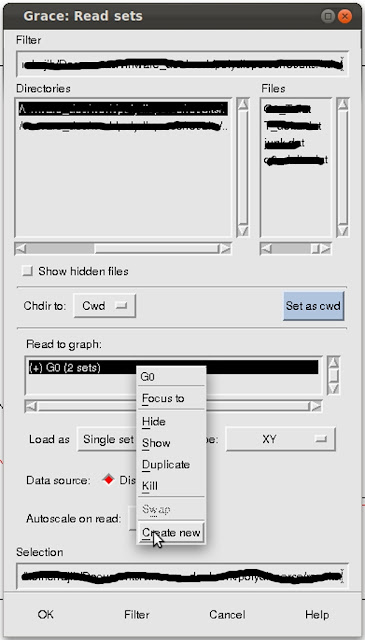
Grace is an opensource data-analysis/plotting software. Grace runs on practically any version of Unix-like OS. As well, it has been successfully ported to Win9*/NT/2000/XP (some minor functionality may be missing, though). The inset plot can be generated by following way: Give command in terminal: xmgrace dataset1.dat , (or import data by Data -> Import -> ASCII in other platforms) will create the plot of dataset1.dat in the main window (call it Graph1). Now for creating inset of another dataset let say dataset2.dat in the same graph please follow the following steps. Data -> Import -> ASCII to open the " Grace:Read Sets " dialogue box.  Graph 1 created in step 1 , is labelled G0 . In the " Read to Graph " section the " (+) G0 " graph is selected by default.  Right-click on the " (+) G0 " to open the pop-up menu (see the image).  Select " Create new ". It will create ' (+) G1 ' empty graph.  ...