Posts

VMD High Resolution Image and Movie

Image
A nice wiki can be found here . The followings are my take home notes from various blogs and wikies. High resolution image Here are some steps which I usually follow to make high quality image from VMD. Set the visualization screen (vmdscene) according to requirement Render the vmdscene  using tachyon mode. File -> Render -> Tachyon Change the default Render command to have something like "/tachyon_path/tachyon_exe" -aasamples 12 %s -format TGA -res 1024 1024 -o %s.tga (The resolution can be tuned by changing the value for -res option (which is 1024 1024 in this case). Enable Ambient occlusion lighting in the Display -> Display Settings window by selecting "on" in "Amb. Occl" and "Shadows" choosers. If AO effect is being used, the choice of  material also affect the final visual effects. Use  "Diffuse", "AOshiny", "AOChalky", or "AOEdgy" materials. If th...

Handling multi column data in xmgrace

Let say the data file contains 5 columns and we would like to plot the following 1. Column 1 vs column 3, the correct syntax is   xmgrace -block file -bxy 1:3 2. Column 1 vs. all other columns    xmgrace -nxy file

Coloured terminal output from Fortran

I was just curious to print some of the error messages from fortran code in different color. So I ended up with this suggestion after doing little bit google search - print *, 'Test color print -> '//achar(27)//'[31m Red'//achar(27)//'[0m.' Color codes are: [90m=dark grey [30m=black [91m=peach [31m=red [92m=light green [32m=green [93m=light yellow [33m=yellow [94m=light blue [34m=blue [95m=pink [35m=purple [96m=light aqua [36m=aqua [97m=pearl white

Zero padded integer in BASH

Let say we are trying to print 01 We can do that, using the following command i=1 a=`printf "%0*d\n" 2 $i` If we echo the ${a} variable, we will see the desired formatted integer i.e. 01

MDP files in GROMACS

Molecular dynamics parameters file For energy minimization: em.mdp For NVT simulations: nvt.mdp For NPT simulations: npt.mdp

Create Binary Mixture in GROMACS

BINARY MIXTURE Let say someone is interested to study some protein molecules in Water-Ethanol binary mixture. Now the question is how to create binary solvent like this? In Gromacs genbox is very powerful in this context. If ratio does not matter, then one can use the following command genbox_d -cp ethanol.gro -cs spc216.gro -p topol.top -o water_ethanol.gro -box a b c The above commands will fill the simulation box with ethanol and water molecules with random numbers of water molecules and number of ethanol molecules presents in the ethanol.gro file. However, if one is intend to create some exact number percentage of ethanol-water mixture, the following method will be very useful Water-Ethanol binary mixture of defined % Create a .pdb file of single ethanol molecule. (It is very easy, just google it out or create .pdb from software like pymol, prodrg etc., if .gro file is there, no need to create the .pdb file). Convert that .pdb file to .gro file by executing any one of the fol...

Add missing GPG keys

GPG errors: W: GPG error: http://ppa.launchpad.net jaunty Release: The following signatures couldn't be verified because the public key is not available: NO_PUBKEY 6D975C4791E7EE5E W: A error occurred during the signature verification. The repository is not updated and the previous index files will be used.GPG error: http://ppa.launchpad.net jaunty Release: The following signatures couldn't be verified because the public key is not available: NO_PUBKEY 5A9BF3BB4E5E17B5 W: GPG error: http://ppa.launchpad.net jaunty Release: The following signatures couldn't be verified because the public key is not available: NO_PUBKEY 7FB8BEE0A1F196A8 The fix for this is to re-download the keys using the hexidecimal numbers given in the error. Open a terminal and run the following command sudo apt-key adv --keyserver keyserver.ubuntu.com --recv-keys hexadeciaml-number-shows=in-error The output should look like this: " gpg: requesting key hexadecimal-output from hkp server keyserver.u...

Get the nth positional argument in bash?

Positional argument can be obtained in bash by creating the following file #!/bin/bash n=2 echo ${!n} Running that file in the following way:  ./file.sh sun mon tue wed will print mon The next one also gives the same result  eval echo \${$n}

Recurssive incement of variable in bash

var = $ (( var + 1 )) or (( var = var + 1 )) or (( var += 1 )) or (( var ++)) or let "var=var+1" or let "var+=1" or let "var++"

Log out open remote SSH session

Kill forgotten ssh login pkill -9 -t pts/0

Usefull tips for FORTRAN

Few tips for FORTRAN: Get arguments from command line character (len = 20) :: arg1 call getarg (1, arg1) if (len_trim(arg1) == 0) then     print*,'No Arg1 provided' stop endif read (arg1, *) nsteps In this example FORTRAN takes the first arguments and read as number of steps. Always use the warning if loop for multiple argument, sometimes one might miss to give inputs of one argument and it becomes difficult to debug the code. Use bash shell command in FORTRAN character (len = 1024) :: command command = 'cp file1 folder1/' call system ( trim(command)) In this example file1 is copied to folder1/ Print integer padded by zeros Let say we would like to print 4 digit integer as 0001 0002 .... 9999 only thing we have use a formatting string I4.4 and we are done. Get number of lines in a data file open(unit,file='filename') nline = 0 do     read (unit, *, end = 10)     nlines = nlines + 1 end do 10 close(unit)

VMD TIPS

LOAD MULTIPLE TRAJECTORIES IN VMD set filelist [glob *.pdb] foreach file $filelist {mol new $file waitfor all}  

Mac - OS and VIM Tips

Mac - OS and VIM Tips To get the desired feature edit ~/.vimrc file Enable text color filetype plugin indent on  syntax on Jump to beginning/end of a line using Shift Home/End  :map <ESC>[H <Home>  :map <ESC>[F <End>  :imap <ESC>[H <C-O><Home>  :imap <ESC>[F <C-O><End>  :cmap <ESC>[H <Home>  :cmap <ESC>[F <End> Jump from one word to another using the option + forward arrow and backword arrow combinations  :map <ESC>f el  :imap <ESC>b <C-o>b  :imap <ESC>f <C-o>el  :cmap <ESC>f el

Fortran code for sorting a data array

This program can be used to sort a set of data array either in ascending or descending order. program sort_data implicit none integer, parameter :: array_length = 100 integer :: i, count double precision, dimension(1:array_length) :: data double precision :: temp logical :: not_sorted open(unit=1, file='data.input', action='read', status='old') read(1,*) (data(i), i=1, array_length) not_sorted = .TRUE. do while (not_sorted)      count = 0      do i = 1, state - 1           temp = data(i) ! if one needs to get ascending order need to change here .LT. to .GT.          if (data(i) .LT. data(i + 1)) then             data(i) = data(i+1)             data(i+1) = temp             count = count          else             count = count + 1         ...

Bash Shell Scripting for file handling

Add two single column file side by side Of same length   awk 'NR==FNR{_[NR]=$0;next}{print $1,$2,_[FNR]}' file2 file1 Of different length awk 'NR==FNR { a[c=FNR]=$0; next }{ printf "%-8s \t %s\n", a[FNR], $0 } END { for(i=FNR+1;i<=c;i++) print a[i] }' file2 file1 Cut n-th column of a file to separate file   awk < infile '{print $n}' > outfile

VIM-Search-TIPS

Image
Search and replace globally :%s/search-string/replace-string/g Search and replace within a range of particular row and column :1,4 /\%1cYYY/ZZZ/g   Search using case sensitive string /abCdEf\C          "Case sensitive /abCdEf\c          "Case insensitive Search and replace interactively :%s/search-string/replace-string/gc

Printf and awk

AWK cat input | awk '{printf "%9.6f %9.6f %9.6f\n", $1, $2, $3}' > output

Handle large statically allocated data in fortran (> 2GB)

Typical error occurs in this case fortranfile.f:someline numbe: relocation truncated to fit: R_X86_64_PC32 against `.bss' fortranfile.f:someline numbe: additional relocation overflows omitted from the output Solution: Compile the fortran file with the following option -mcmodel medium -shared-intel Source Link: Intel Forum

Grace Type Settings

Control code Description \f{x} switch to font named "x" \f{n} switch to font number n \f{} return to original font \R{x} switch to color named "x" \R{n} switch to color number n \R{} return to original color \#{x} treat "x" (must be of even length) as list of hexadecimal char codes \t{xx xy yx yy} apply transformation matrix \t{} reset transformation matrix \z{x} zoom x times \z{} return to original zoom \r{x} rotate by x degrees \l{x} slant by factor x \v{x} shift vertically by x \v{} return to unshifted baseline \V{x} shift baseline by x \V{} reset baseline \h{x} horizontal shift by x \n new line \u begin underline \U stop underline \o begin overline \O stop overline \Fk enable kerning \FK disable kerning \...

Draw dipole vector of a tagged molecule in VMD

Image
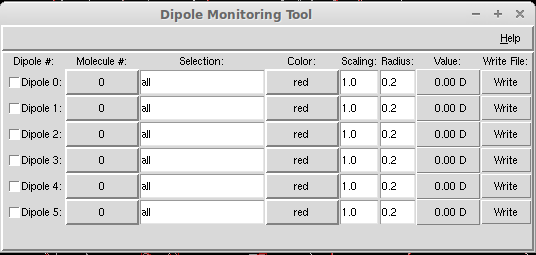
It is often needed to visualize the dipole orientation of a tagged molecule. The following steps will guide to achieve this Select the molecule by its resid  Open Tk console from drop down menu of Extensions → Tk Console  Select every atom of the molecule by separate nicknames, by using the following command. Let say we would like to see the dipole moment vector of water molecules, in that case, the following codes need to be used  set ow [atomselect top "type OW"]  set hw1 [atomselect top "type HW1"] set hw2 [atomselect top "type HW2"]  Then set charge of every atom by using the following commands  $ow set charge -1.00 $hw1 set charge -0.5 $hw2 set charge -0.5 Finally open the Etensions → Visualizations → Dipole Moment Watcher The following window will pop up Then select the molecules by its resid and change the color of the dipoles according to your need. One can select maximum of six dipoles to show at a time. The final snap will...